
Independent by design: a customer-controlled runtime
The Vayon AI customer deployment runs in your environment and does not depend on Vayon AI vendor services at runtime. Licensing is offline and signed; there is no online activation and no phone-home for operation.
Govern. Route. Audit.
What stays under your control
You control the database, model choices and identity integration; Vayon AI runs inside your Customer Environment.
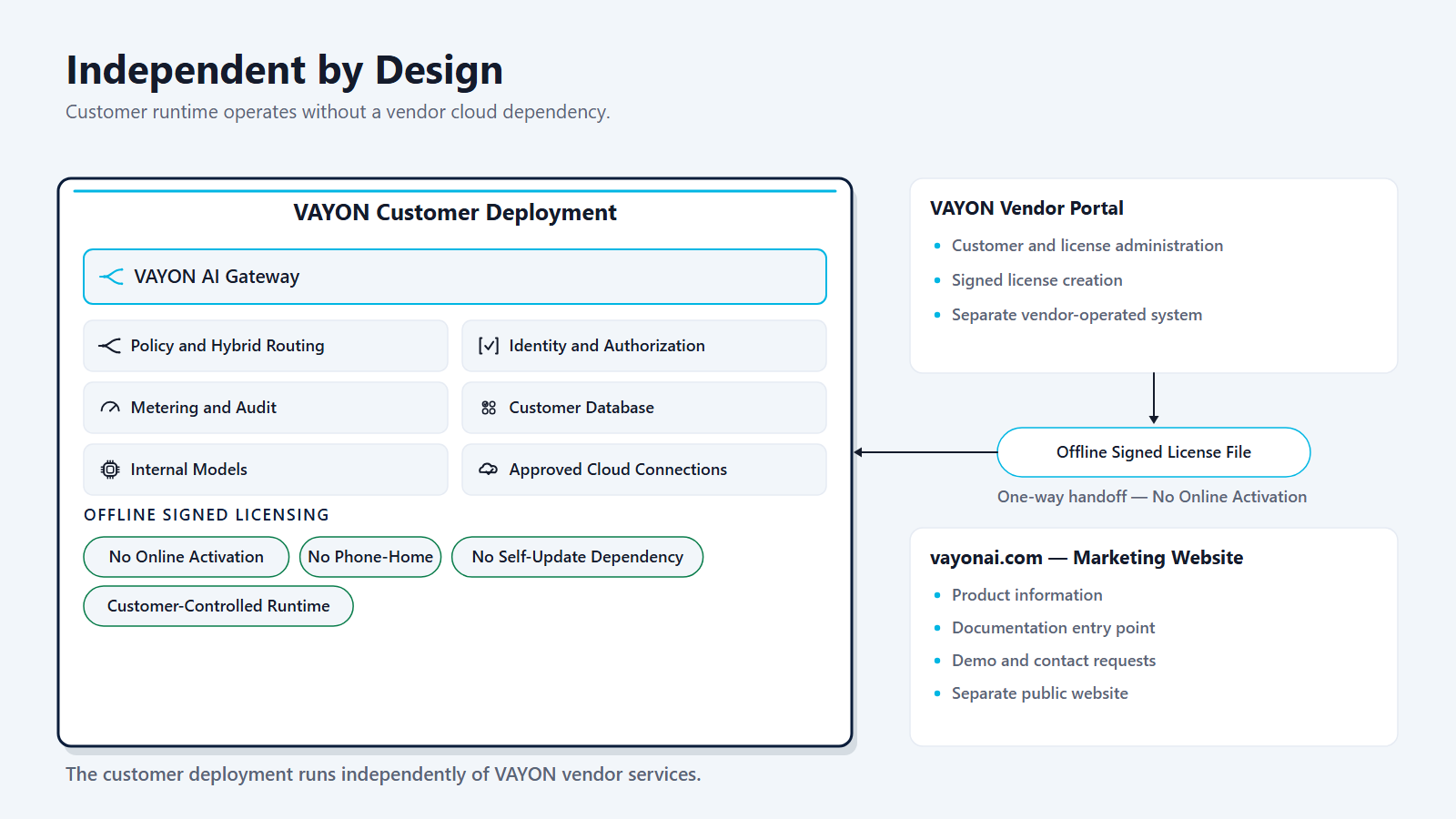
Customer environment
- Employees, developers and business systems
- Vayon AI Customer Deployment
- Organizational identity & knowledge sources
- Internal models & customer-approved cloud connectivity
Vayon AI (vendor side)
- Offline licence preparation and delivery
- Commercial and support operations
Never on the customer runtime request path
- No customer AI request leaves your environment for a Vayon AI system
- The customer runtime does not depend on any Vayon AI vendor service
- Offline signed licensing remains the licensing model
- Approved cloud execution may still require customer-approved outbound connectivity
- No online activation, no phone-home, no self-update dependency
Offline signed licensing
A licence is prepared offline by Vayon AI as a signed file and handed over one way to the customer deployment. Nothing calls back.
No online activation, no phone-home, no self-update dependency
Operation does not require online activation, phone-home, or a self-update dependency on vendor services.
Internal and approved cloud model connectivity
Connect internal models and approved cloud models, including GCP Vertex AI, AWS Bedrock and Azure OpenAI. Approved cloud models may require customer-approved outbound connectivity — separate from any runtime dependence on Vayon AI.
Guided setup and readiness
A guided setup/readiness view helps you reach governed AI readiness.

A reference adoption journey
A conceptual path from first connection to ongoing governance — a reference journey, not a claim of a hands-off or fixed-time installation.
-
Connect
- Connect internal models
- Configure approved cloud providers where allowed
- Connect organizational identity and key infrastructure
-
Define
- Define sensitivity and policy boundaries
- Define eligible models and use cases
- Configure authorization and egress rules
-
Integrate
- Connect governed chat
- Connect developer tools
- Connect business systems through Integration Clients and APIs
-
Govern
- Review routing decisions
- Monitor usage and metering
- Review safe audit evidence
- Improve policies and model eligibility over time
A packaged deployment, its database and its recovery
Vayon AI is delivered for customer-controlled infrastructure over a supported installation path — Windows Server with Hyper-V, an Ubuntu guest, Docker and the Vayon AI application stack — and the standard deployment brings its own PostgreSQL database with persistent storage, health checks, schema migration and backup tooling. Install connected, restricted or fully offline: in the restricted and offline profiles the installer refuses to create outbound network access, and no internet is needed during installation. Upgrades run from delivered media whose files are checksum-verified against a signed release manifest, with a mandatory pre-upgrade backup and the previous image retained. Restore verification compares the restored database against the fingerprint recorded at backup time and proves an encrypted record still decrypts, without revealing it. A governed database migration workflow carries a move to your organizational database through readiness, preview, resumable transfer and verification. PostgreSQL, Microsoft SQL Server and Oracle are supported target engines, validated end to end against each; the final connection cutover is performed by your team as a controlled host-side step. The architecture supports several application nodes against one shared database, with readiness probes, coordinated scheduled jobs and bounded configuration coherence; the load balancer and the database replication topology remain yours.

Check it against your environment
Bring your constraints - network, identity, database, offline requirements - and see where they land.